Lecture notes — Defining and Calling Functions
ver. 1.0.0, 3_defining_and_calling_functions
← Defining and Calling Functions
ver. 1.0.0 · 2026-08-21 00:38:49
Where we are
Kotlin Basics taught the syntax for declaring things. This unit is about the calling side — and about a feature that has no Java equivalent at all.
It is organised around a running example. joinToString — turning a collection into a string with a separator, prefix and postfix — is written and rewritten as each feature arrives, and by the end it is a one-line call available on every collection. Following that single function through the unit is the fastest way to see what each feature actually buys.
What you will be able to do
create-collections— Create Kotlin collections and say what they actually are.use-named-arguments— Call a function with named arguments and say when they earn their place.use-default-parameter-values— Give parameters default values and eliminate overloads.write-top-level-functions— Declare functions and properties at the top level, outside any class.write-extension-functions— Add a method to a class you do not own, and explain how it works.explain-extension-dispatch— Explain why extension functions are not overridable.declare-extension-properties— Declare an extension property with a custom accessor.use-varargs-and-the-spread-operator— Declare a vararg function and pass an existing array to one.use-infix-calls-and-destructuring— Use infix notation for one-argument functions and destructure the result.work-with-strings-and-regexes— Use Kotlin’s string extensions and triple-quoted strings for parsing.use-local-functions— Extract a local function to remove duplication without polluting the namespace.
What we will cover
- Collections — what Kotlin’s actually are, which is more interesting than it sounds.
- Easier calls — named arguments, default values, top-level functions.
- Extension functions and properties — the central idea of the unit.
- Varargs, infix calls, destructuring — the small features that make library APIs read well.
- Strings and regexes — where extensions fix a real wart rather than adding sugar.
- Local functions — removing duplication without adding a method nobody should call.
The question this unit answers
Unit 1 committed Kotlin to full interoperability with Java. This unit is where that commitment first costs something, and where the payment turns out to be interesting.
Watch for the tension: Kotlin reuses Java’s collection classes, but Java’s collection API is thin. How does a language give a rich API to classes it does not own and cannot change?
Learning outcomes
- create-collections: Create Kotlin collections and say what they actually are.
What Kotlin collections really are
Creating them is unremarkable:
val set = hashSetOf(1, 7, 53)
val list = arrayListOf(1, 7, 53)
val map = hashMapOf(1 to "one", 7 to "seven", 53 to "fifty-three")
to in that last line is worth a mental note. It looks like syntax. It is not, and we come back to it later in this unit.
Now ask each one what it is:
println(set.javaClass)    // class java.util.HashSet
println(list.javaClass)   // class java.util.ArrayList
println(map.javaClass)    // class java.util.HashMap
Kotlin does not have its own collection classes. These are the standard Java classes, unchanged.
Why
It is unit 1’s interoperability commitment applied to the most-used part of the standard library. A Kotlin list passed to a Java method needs no conversion, because it is a Java list. Every existing library that accepts a List accepts a Kotlin list, with no adapter, no copy, and no surprise.
The problem it creates
Java’s collection API is thin. Kotlin, meanwhile, offers things Java does not:
val strings = listOf("first", "second", "fourteenth")
println(strings.last())      // fourteenth
println(setOf(1, 14, 2).max())   // 14
Neither last() nor max() exists on java.util.List or java.util.Set.
So how? Kotlin cannot modify Java’s classes — they ship in the JDK. It cannot subclass them, because listOf returns the real thing. And it will not wrap them, because wrapping would defeat the interoperability that motivated using them.
How does Kotlin add a rich API to classes it does not own?
The extension function section answers it, and the answer is the most important idea in this unit. Everything before it is preparation.
Concepts
- extension-functions: the mechanism that will answer the question this section opened
Named arguments
Start the running example. Here is joinToString, written the obvious way:
fun <T> joinToString(
        collection: Collection<T>,
        separator: String,
        prefix: String,
        postfix: String
): String {
    val result = StringBuilder(prefix)
    for ((index, element) in collection.withIndex()) {
        if (index > 0) result.append(separator)
        result.append(element)
    }
    result.append(postfix)
    return result.toString()
}
It works. The problem is at the call site:
joinToString(collection, " ", " ", ".")Three strings in a row and no way to tell which is which without opening the signature. Java’s answer to this is a comment; Kotlin’s is to name the arguments:
joinToString(collection, separator = " ", prefix = " ", postfix = ".")The names are checked by the compiler, and once you name one argument every later one must also be named — which prevents the half-named call that is harder to read than either extreme.
Named arguments do not work when calling Java methods.
Java bytecode does not reliably preserve parameter names, so there is nothing for Kotlin to match against. The IDE may show you the names; the compiler cannot verify them.
This is the first of several places where a Kotlin feature stops at the Java boundary.
Learning outcomes
- use-named-arguments: Call a function with named arguments and say when they earn their place.
Concepts
- named-arguments: naming at the call site, checked by the compiler
Default parameter values
Most callers of joinToString want a comma and no brackets. In Java that means a family of overloads, each delegating to the fullest one. In Kotlin it means declaring defaults:
fun <T> joinToString(
        collection: Collection<T>,
        separator: String = ", ",
        prefix: String = "",
        postfix: String = ""
): String
And now:
joinToString(list, ", ", "", "")   // as before
joinToString(list)                 // ", " and no brackets
joinToString(list, "; ")           // just the separator
Where the two features compose
This is the payoff, and it is why the two sections belong together. With positional arguments you can only omit parameters from the end. With named arguments you can omit any subset, in any order:
joinToString(list, postfix = ";", prefix = "# ")The separator in the middle stays at its default while both bracket parameters are supplied. Java’s overload family cannot express that at all — you would need an overload for every combination.
@JvmOverloads
Java callers cannot use defaults, because the concept does not exist in Java. Annotate the function and the compiler generates the overload family for them:
@JvmOverloads
fun <T> joinToString(collection: Collection<T>, separator: String = ", ", ...)
This is the first @Jvm* annotation in the module and not the last. Each one exists to make a Kotlin feature usable from Java, and each marks a place where the two languages do not quite line up. Collecting them as you meet them is a good way to see the seams in the interoperability story.
Learning outcomes
- use-default-parameter-values: Give parameters default values and eliminate overloads.
Concepts
- default-parameter-values: defaults in the signature, and how named arguments let you skip the middle ones
Top-level functions and properties
Where should joinToString live? It belongs to no object. In Java it would go in a class that exists only as a container — Collections, StringUtils, JoinKt — and that class models nothing.
Kotlin lets it live at the top level of a file:
package strings

fun joinToString(...): String { ... }
Import it by name and call it. No class, no instance, no static.
What the compiler does
Worth knowing rather than treating as magic. The JVM has no concept of a function outside a class, so the compiler generates one. A file named join.kt produces a class named JoinKt, with the top-level functions as its static methods:
// from Java
import strings.JoinKt;
JoinKt.joinToString(list, ", ", "", "");
Java callers see exactly the utility class they expect. Kotlin callers never have to mention it.
@JvmName at the top of the file overrides that generated name, which matters when the file is part of a public API Java code will use:
@file:JvmName("StringFunctions")
package strings
Top-level properties
The same idea, and it is how constants are declared:
var opCount = 0                        // static field with getter and setter
val UNIX_LINE_SEPARATOR = "\n"         // static field with getter
const val LINE_SEPARATOR = "\n"        // genuine compile-time constant
const matters for interoperability: without it, Java sees a getter method; with it, Java sees a public static final field, which is what a constant should be.
Kotlin offers a cleaner model and then generates whatever Java expects underneath.
@JvmOverloads generated the overload family. Top-level functions generate a utility class. The next unit will show data classes generating equals and hashCode.
In each case the Kotlin side is smaller and the JVM side is unchanged — which is what makes the interoperability claim hold up in practice rather than only in principle.
Learning outcomes
- write-top-level-functions: Declare functions and properties at the top level, outside any class.
Concepts
- top-level-functions-and-properties: no container class in the source, a generated one in the bytecode
Extension functions
The central idea of the unit, and the answer to the question the collections section left open.
An extension function is a function you declare outside a class but call as though it were a member of it. Prefix the name with the type it extends:
package strings

fun String.lastChar(): Char = this.get(this.length - 1)
Stringis the receiver typethisinside the body is the receiver object, and may be omitted:
fun String.lastChar(): Char = get(length - 1)And the call site looks exactly like a member call:
println("Kotlin".lastChar()) // nHow it actually works
No modification of String, no runtime patching, no proxy. The extension compiles to a static function whose first parameter is the receiver:
// what Java sees
char c = StringUtilKt.lastChar("Java");
Two consequences follow immediately, and they answer the two obvious worries:
- Java can call it. It is a static method with an extra first parameter, so Java code calls it as one, passing the receiver explicitly. Extensions do not break interoperability — they are interoperable by construction.
- It cannot access private or protected members. An extension is not inside the class and receives no special privileges. It is an outsider with pleasant syntax.
That second point is worth dwelling on. An extension cannot break a class’s encapsulation, which is what makes it safe to extend types you do not own.
Imports
Extensions must be imported to be used:
import strings.lastChar
import strings.*
import strings.lastChar as last     // rename to resolve a clash
This is a feature rather than an inconvenience. Two libraries may each define lastChar on String, and the import decides which you get — so nobody’s extension can silently change the meaning of your code.
No overriding
Extensions are dispatched statically, on the declared type of the expression rather than the runtime type of the object:
open class View { open fun click() = println("View clicked") }
class Button : View() { override fun click() = println("Button clicked") }

fun View.showOff() = println("I'm a view!")
fun Button.showOff() = println("I'm a button!")

val view: View = Button()
view.click()      // Button clicked   — member, dynamic dispatch
view.showOff()    // I'm a view!      — extension, static dispatch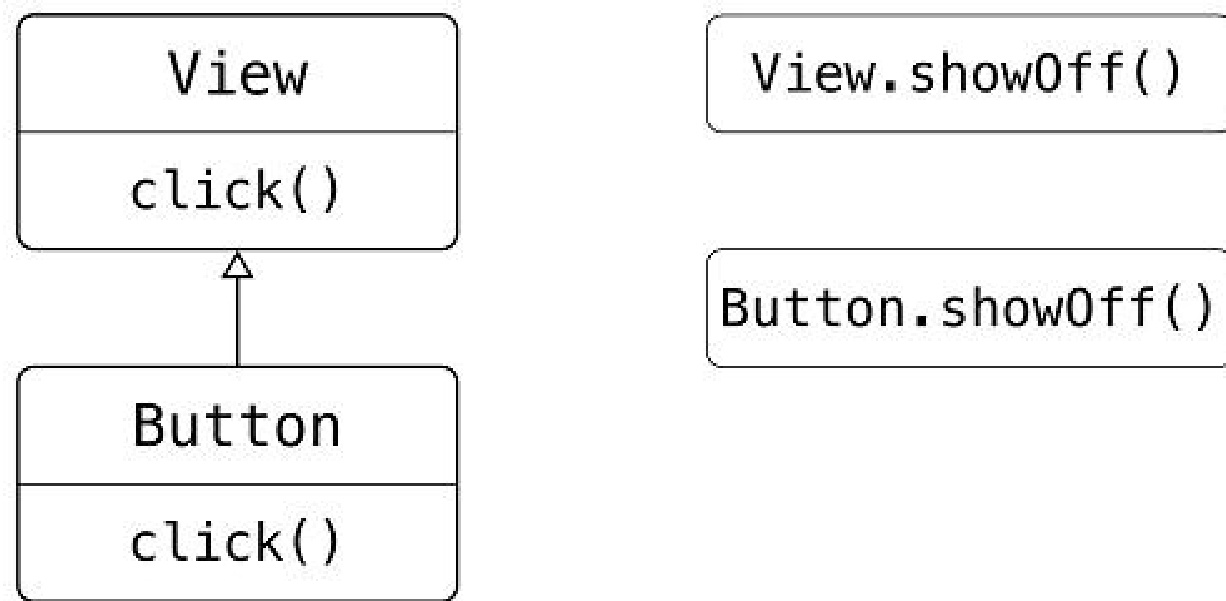
And a member function always wins over an extension with the same signature. If a class later adds a method matching your extension, the class’s version takes over — silently.
It is not a defect. An extension is a static function, and static functions have never been polymorphic.
Knowing this prevents the one real surprise extensions can spring on you. It is also a good reason not to write an extension that a class ought to have as a member — if you own the class, put it in the class.
Extension properties
The same idea for properties:
val String.lastChar: Char
    get() = get(length - 1)

var StringBuilder.lastChar: Char
    get() = get(length - 1)
    set(value: Char) { this.setCharAt(length - 1, value) }
Because there is nowhere to store a value, an extension property must have a custom getter — it is always computed, never held. A var extension property is possible when the receiver is mutable and the setter can do the work.
Choose between an extension property and an extension function on the same grounds as before: a characteristic, not an action.
Now the question is answered
Go back to the collections section. listOf returns a java.util.ArrayList. And:
strings.last()
setOf(1, 14, 2).max()
list.joinToString(", ")
Every one of these is an extension function on a Java interface, declared in the Kotlin standard library. Kotlin gets exactly the API it wants on classes it does not own, and gives up nothing in interoperability to get it.
The collection API you use every day is a library of extensions. That is the whole trick.
Learning outcomes
- write-extension-functions: Add a method to a class you do not own, and explain how it works.
- explain-extension-dispatch: Explain why extension functions are not overridable.
- declare-extension-properties: Declare an extension property with a custom accessor.
- create-collections: Create Kotlin collections and say what they actually are.
Concepts
- extension-functions: a static function with a receiver, which is why Java can call it and why it cannot override
- extension-properties: computed on access, because there is no backing field to store into
Varargs, infix calls and destructuring
Three small features, together responsible for how the standard library reads.
Varargs
listOf takes any number of arguments because its parameter is marked vararg:
fun listOf<T>(vararg values: T): List<T> { ... }Where Kotlin differs from Java is passing an existing array. Java passes it directly and hopes you meant what it guessed. Kotlin makes you say:
fun main(args: Array<String>) {
    val list = listOf("args: ", *args)   // spread operator
}
The * is the spread operator, and it unpacks the array into separate arguments.
Requiring it is deliberate. In Java, whether an array argument means one array or these elements depends on context, and getting it wrong is a known source of quiet bugs. Kotlin makes the intent explicit — and note that the spread lets you mix unpacked elements with fixed ones, which Java cannot do at all.
Infix calls
A function of exactly one argument may be marked infix, and then called without the dot and parentheses:
1.to("one")     // ordinary call
1 to "one"      // infix call
Here is its declaration in the standard library:
infix fun Any.to(other: Any) = Pair(this, other)to is not syntax
Look at that declaration again. to is an ordinary extension function on Any, marked infix, returning a Pair.
Which means the map literal from the top of this unit —
mapOf(1 to "one", 7 to "seven")— is not special syntax either. It is a function call, mapOf, taking varargs of Pair, each built by an infix extension function.
This is the first solid evidence for the DSL claim from unit 1: something that looks like language support turns out to be a library. The last unit of this module builds on exactly this.
Destructuring declarations
A Pair can be unpacked into two variables in one declaration:
val (number, name) = 1 to "one"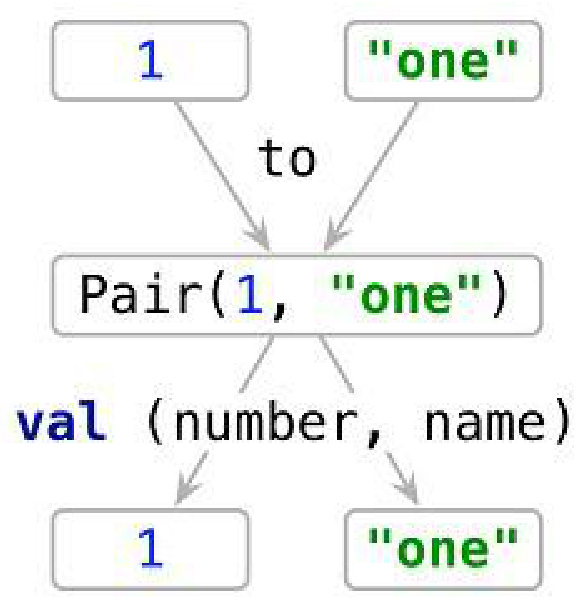
to creates a Pair; a destructuring declaration unpacks it.That is also what made the map-iteration loop in the previous unit work:
for ((index, element) in collection.withIndex()) { ... }Destructuring is itself a convention, backed by generated component1() and component2() functions, and it returns properly in the operator-overloading unit. Here it is enough to use it and know that it generalises to your own types.
Learning outcomes
- use-varargs-and-the-spread-operator: Declare a vararg function and pass an existing array to one.
- use-infix-calls-and-destructuring: Use infix notation for one-argument functions and destructure the result.
Concepts
- varargs-and-spread-operator: any number of arguments, and an explicit
*to unpack an array into them - infix-calls:
1 to "one"is a function call, not syntax - destructuring-declarations: unpacking a value into several variables at once
Strings and regular expressions
This section is the best argument for extension functions in the book, because it fixes a wart rather than adding sugar.
The Java problem
"12.345-6.A".split(".") // returns an empty arrayJava’s String.split takes a regular expression, not a plain delimiter — and in a regex, . matches any character. So splitting on a literal dot splits at every position and yields nothing.
The signature gives no hint. The failure is silent. This is a genuinely bad API, and it has been shipping for decades.
Kotlin’s fix
Extension overloads that make the distinction visible in the types:
"12.345-6.A".split("\\.", "-")           // delimiters as plain strings
"12.345-6.A".split(".", "-")             // also plain — no regex here
"12.345-6.A".split("\\.|-".toRegex())    // a Regex, explicitly
You can no longer pass a regular expression by accident, because a String argument means a literal delimiter and a regex must be a Regex.
Parsing without a regex
The book parses a file path into directory, filename and extension using only string extensions:
fun parsePath(path: String) {
    val directory = path.substringBeforeLast("/")
    val fullName = path.substringAfterLast("/")
    val fileName = fullName.substringBeforeLast(".")
    val extension = fullName.substringAfterLast(".")

    println("Dir: $directory, name: $fileName, ext: $extension")
}
Worth writing this version first. It is more readable than the regex, easier to debug, and a useful reminder that a regular expression is not always the right tool.
Parsing with one, and triple-quoted strings
The regex version needs a pattern full of backslashes, each of which must be escaped again inside a normal string literal — the notorious "\\\\." soup. A triple-quoted string takes no escape sequences:
fun parsePath(path: String) {
    val regex = """(.+)/(.+)\.(.+)""".toRegex()
    val matchResult = regex.matchEntire(path)
    if (matchResult != null) {
        val (directory, filename, extension) = matchResult.destructured
        println("Dir: $directory, name: $filename, ext: $extension")
    }
}
Two things worth noting: the pattern is written exactly as it is meant, and destructured gives back the groups as a destructurable value — the same feature as two sections ago, doing real work.
Multiline text
Triple-quoted strings also span lines, preserving formatting exactly. Since the source indentation becomes part of the string, trimMargin removes leading whitespace up to a marker:
val kotlinLogo = """| //
                   .| //
                   .|/ \""".trimMargin(".")
The literal can be indented to match the surrounding code without that indentation appearing in the output.
Learning outcomes
- work-with-strings-and-regexes: Use Kotlin’s string extensions and triple-quoted strings for parsing.
- write-extension-functions: Add a method to a class you do not own, and explain how it works.
Concepts
- triple-quoted-strings: no escape sequences, and multiline text with
trimMargin
Local functions and tidy code
The closing section, and it combines several of the unit’s features on one problem.
The problem
class User(val id: Int, val name: String, val address: String)

fun saveUser(user: User) {
    if (user.name.isEmpty()) {
        throw IllegalArgumentException(
            "Can't save user ${user.id}: empty Name")
    }
    if (user.address.isEmpty()) {
        throw IllegalArgumentException(
            "Can't save user ${user.id}: empty Address")
    }
    // save to the database
}
The two checks are the same shape, differing only in the field and the message. With a third field they would be three, and the duplication would be worth fixing.
The unsatisfactory fix
Extract a private method. It removes the duplication, and it adds a method to the class that nothing else should ever call — cluttering the class’s interface with an implementation detail of one function.
The local function
Nest the validation inside the function that uses it:
fun saveUser(user: User) {
    fun validate(user: User, value: String, fieldName: String) {
        if (value.isEmpty()) {
            throw IllegalArgumentException(
                "Can't save user ${user.id}: empty $fieldName")
        }
    }

    validate(user, user.name, "Name")
    validate(user, user.address, "Address")
}
A local function can see the enclosing function’s parameters and locals directly, so user need not be passed at all:
fun saveUser(user: User) {
    fun validate(value: String, fieldName: String) {
        if (value.isEmpty()) {
            throw IllegalArgumentException(
                "Can't save user ${user.id}: empty $fieldName")   // user captured
        }
    }

    validate(user.name, "Name")
    validate(user.address, "Address")
}
Tidying further with an extension
Move the validation to an extension function on User:
fun User.validateBeforeSave() {
    fun validate(value: String, fieldName: String) {
        if (value.isEmpty()) {
            throw IllegalArgumentException(
                "Can't save user $id: empty $fieldName")
        }
    }

    validate(name, "Name")
    validate(address, "Address")
}

fun saveUser(user: User) {
    user.validateBeforeSave()
    // save to the database
}
Now the validation lives with the type it validates, saveUser is one line of intent, and any code holding a User can validate one — while the User class itself is untouched, because the extension is declared outside it.
These features are not independent conveniences. Named arguments, defaults, top-level functions, extensions and local functions are all answers to the same question:
Where should this code live, so that it is easy to call and easy to read?
Java answers “inside a class” every time, because it has no other answer available. Kotlin’s answer is repeatedly not necessarily inside a class — and that flexibility is what lets code sit where it makes sense rather than where the language insists.
Learning outcomes
- use-local-functions: Extract a local function to remove duplication without polluting the namespace.
What you can now call
You can make functions pleasant to call, put them where they belong, and add them to classes you do not own.
Learning outcomes
- create-collections: Create Kotlin collections and say what they actually are.
- use-named-arguments: Call a function with named arguments and say when they earn their place.
- use-default-parameter-values: Give parameters default values and eliminate overloads.
- write-top-level-functions: Declare functions and properties at the top level, outside any class.
- write-extension-functions: Add a method to a class you do not own, and explain how it works.
- explain-extension-dispatch: Explain why extension functions are not overridable.
- declare-extension-properties: Declare an extension property with a custom accessor.
- use-varargs-and-the-spread-operator: Declare a vararg function and pass an existing array to one.
- use-infix-calls-and-destructuring: Use infix notation for one-argument functions and destructure the result.
- work-with-strings-and-regexes: Use Kotlin’s string extensions and triple-quoted strings for parsing.
- use-local-functions: Extract a local function to remove duplication without polluting the namespace.
Conclusion
Kotlin’s collections are Java’s collections.
listOfreturns ajava.util.ArrayList. That is the interoperability commitment reaching the standard library, and it created the problem the rest of the unit solves.The extension function is the answer, and the mechanism explains everything about it.
A static function with the receiver as its first parameter. That is why Java can call it, why it cannot see private members, and why it cannot be overridden. One fact, three consequences.
Kotlin’s entire collection API is a library of extensions.
last,max,joinToString,filter,map— none of them exists on Java’s interfaces. Kotlin added them from outside, without touching a class it does not own.Named arguments and defaults together do what overloads cannot.
Defaults alone let you omit from the end. Naming lets you omit from the middle. Together they replace a combinatorial family of Java overloads with one signature.
tois a function, not syntax.An
infixextension onAnyreturning aPair. Map literals are function calls. This is the first real evidence that Kotlin’s DSL claim is about composition rather than special cases.The unit’s real question is where code should live.
Top-level functions, extensions and local functions are three answers, and none of them is “inside the class”. That flexibility is what makes Kotlin code sit where it makes sense.
Where next
The next unit, Classes, Objects, and Interfaces, turns to declarations: interfaces with default implementations, the open/final/abstract modifiers and why Kotlin classes are final by default, constructors, data classes, delegation, and the object keyword.
It is where you find out how much of a Java class the compiler will write for you.
References
- Kotlin in Action, Second Edition, Sebastian Aigner, Roman Elizarov, Svetlana Isakova, and Dmitry Jemerov, Manning, April 2024 — Link — Page 51-77